
Arewa Recently Viewed Content WordPress plugin
Professional WordPress Plugins
Table of Contents
Introduction
**Arewa Recently Viewed Content* is a powerful WordPress plugin designed to track and display recently viewed content for both logged-in and guest users. This comprehensive documentation will guide you through installation, configuration, and advanced usage of the plugin.
### What is Recently Viewed Content Tracking?
Recently viewed content tracking is a user experience feature that displays a personalized list of pages, posts, or products that a visitor has recently browsed on your website. This feature:
**Improves User Engagement**: Helps visitors quickly return to content they were interested in
**Increases Conversions**: Reminds users of products or articles they viewed
**Enhances Navigation**: Provides a personalized browsing history
**Boosts Return Visits**: Encourages users to continue where they left off
Why Choose Arewa Recently Viewed Content?
Unlike other tracking plugins, Arewa Recently Viewed Content offers:
✅ **Dual Tracking System**: Works for both logged-in users and guests
✅ **Automatic Sync**: Merges guest history into user accounts on login
✅ **Privacy-Friendly**: No external tracking or third-party services
✅ **Multiple Layouts**: Four professional layout options
✅ **WooCommerce Ready**: Dedicated shop layout for e-commerce
✅ **Mobile Optimized**: Works perfectly in mobile apps and WebView
✅ **Performance Focused**: Lightweight and optimized code
Key Features
### 1. Dual User Tracking System
#### Logged-In Users
– History stored in WordPress user meta
– Persistent across devices and sessions
– Configurable maximum items (default: 100)
– Secure database storage
#### Guest Users
– History stored in browser cookies
– 30-day cookie expiration
– Configurable maximum items (default: 50)
– Works in mobile apps and WebView
#### Automatic History Sync
When a guest user logs in, the plugin automatically:
1. Retrieves guest history from cookies
2. Merges with existing user history
3. Removes duplicates (keeps most recent)
4. Saves to user meta
5. Clears guest cookie
### 2. Multiple Content Types Support
Track any WordPress content type:
– **Posts**: Blog articles and news
– **Pages**: Static pages and landing pages
– **Products**: WooCommerce products
– **Custom Post Types**: Movies, courses, events, etc.
Four Professional Layouts
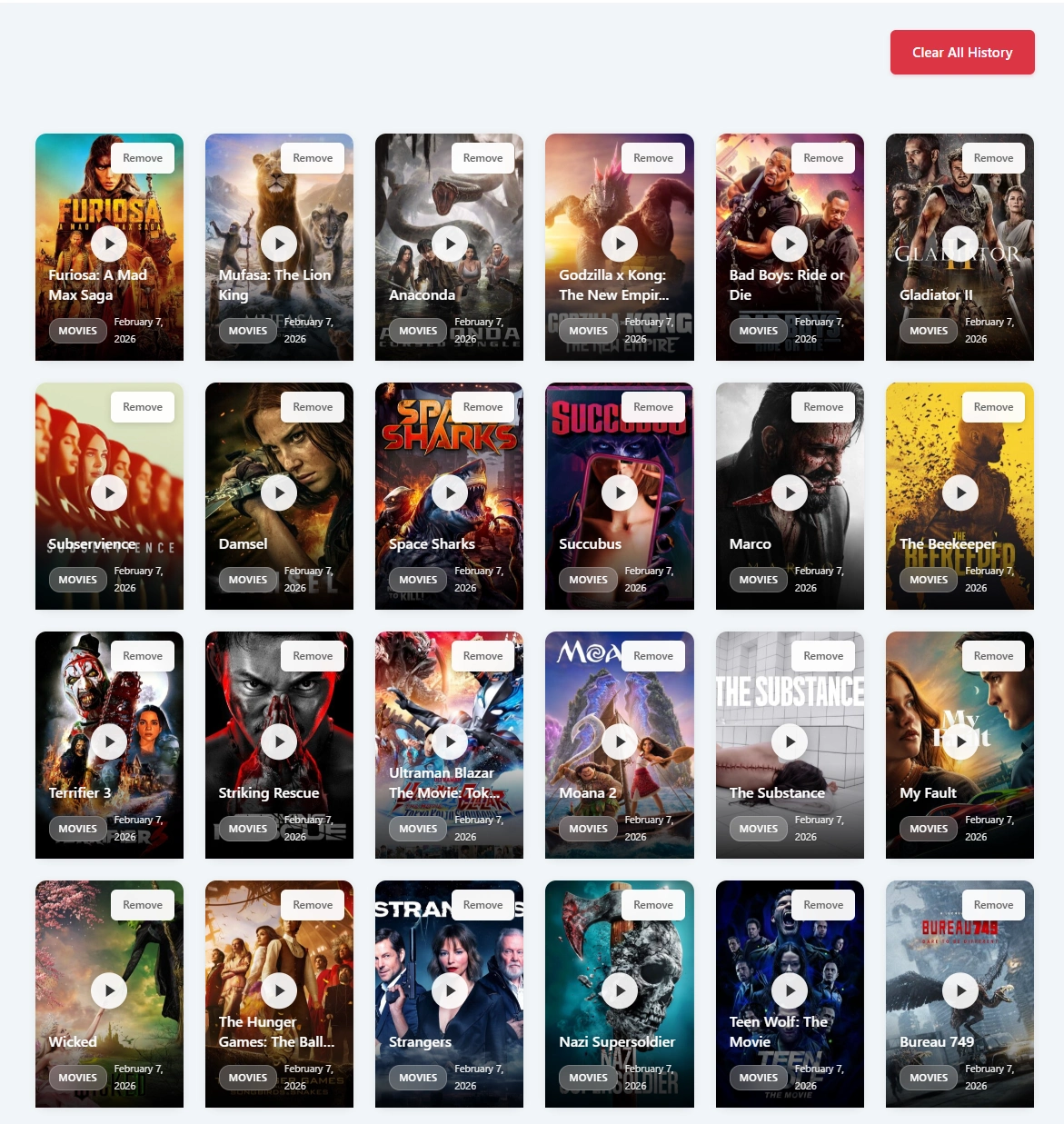
Video Layout
Perfect for media-heavy websites: - Grid-based responsive design - Large thumbnail images - Overlay text with metadata - Play button icon - Configurable columns (desktop, tablet, mobile)
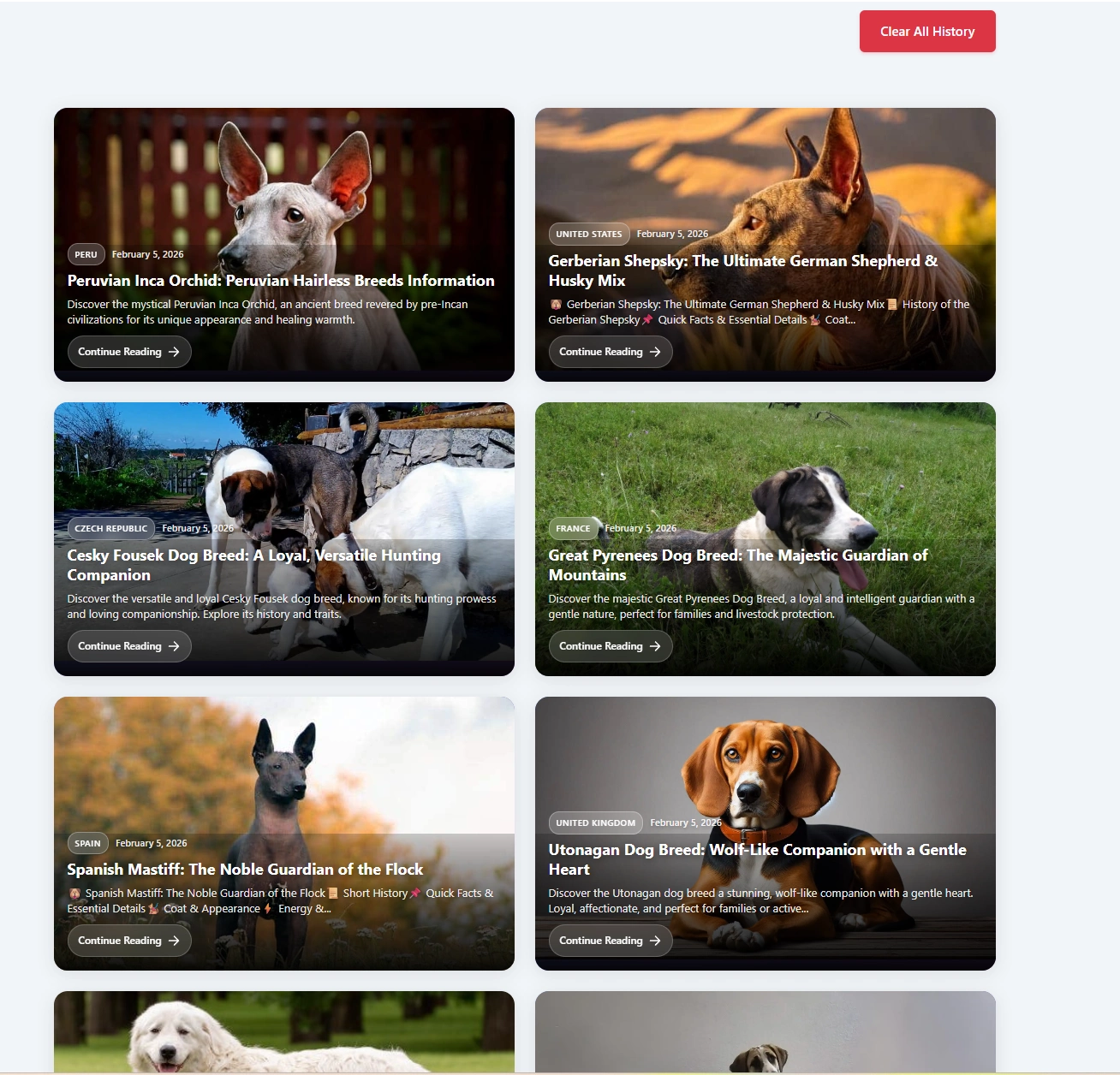
Article Layout
Ideal for blogs and news sites: - Magazine-style responsive grid - 2 columns on desktop/tablet - 1 column on mobile - Featured images with gradient overlay - Excerpt display - Category badges - "Continue Reading" button
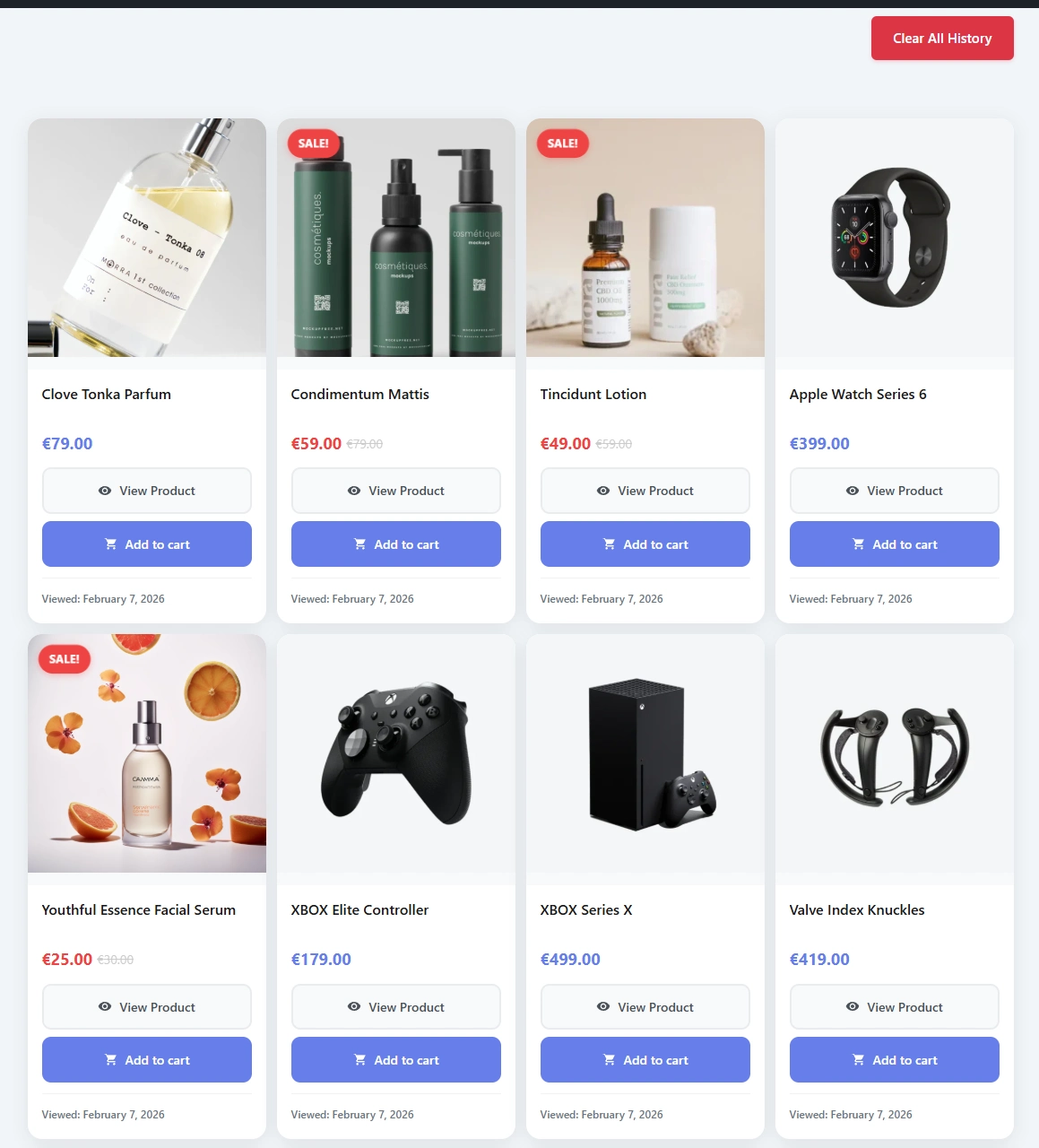
Shop Layout
Optimized for WooCommerce: - Product grid or carousel mode - Product images with sale badges - Price display - "Add to Cart" button - Stock status indicators - Recently viewed badge
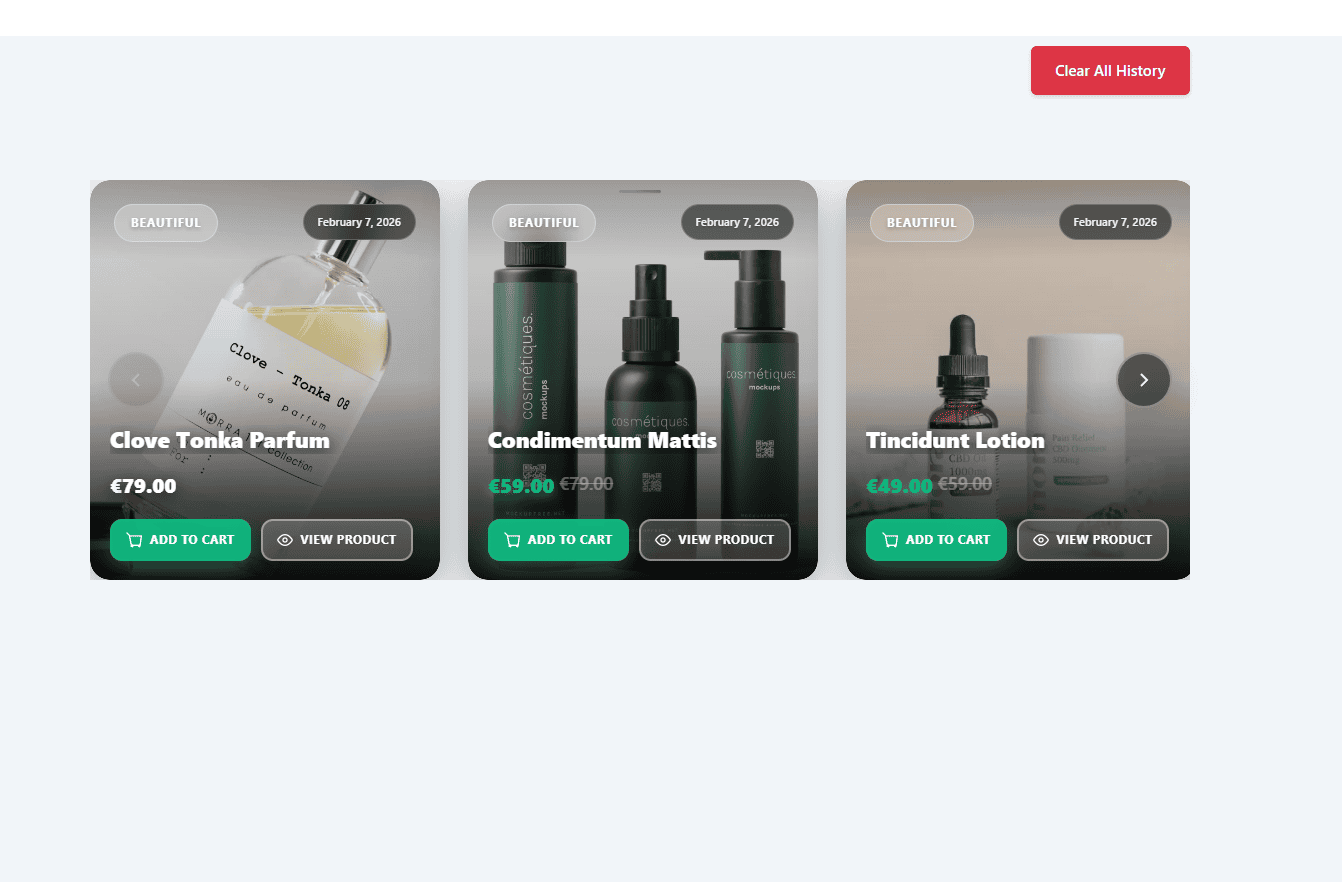
Carousel Layout
Great for homepage widgets: - Horizontal scrolling - Previous/Next navigation - Dot indicators - Touch/swipe support - Auto-height adjustment
### 4. Advanced Filtering Options
Filter displayed content by:
– **Post Type**: Show only specific content types
– **Category**: Filter by category names or slugs
– **Taxonomy**: Filter by custom taxonomy terms
– **Limit**: Control number of items displayed
– **Date Range**: Show content from specific periods
### 5. Privacy & Security Features
– **No External Tracking**: All data stored locally
– **GDPR Compliant**: Privacy-friendly cookie usage
– **Secure Nonce Verification**: Protected AJAX requests
– **Data Sanitization**: All inputs validated and sanitized
– **Clean Uninstall**: Optional complete data removal
Installation Guide
Method 1: WordPress Admin Panel (Recommended)
1. **Login to WordPress Admin**
– Navigate to your WordPress dashboard
– Go to `Plugins > Add New`
2. **Search for Plugin**
– In the search box, type “Arewa Recently Viewed Content”
– Locate the plugin in search results
3. **Install Plugin**
– Click the “Install Now” button
– Wait for installation to complete
4. **Activate Plugin**
– Click “Activate” button
– Plugin is now active and ready to configure
Method 2: Manual Upload
1. **Download Plugin**
– Download the plugin ZIP file from WordPress.org or Arewa.dev
2. **Upload to WordPress**
– Go to `Plugins > Add New > Upload Plugin`
– Click “Choose File” and select the ZIP file
– Click “Install Now”
3. **Activate**
– After installation, click “Activate Plugin”
Method 3: FTP Upload
1. **Extract ZIP File**
– Extract the plugin ZIP file on your computer
2. **Upload via FTP**
– Connect to your server via FTP
– Navigate to `/wp-content/plugins/`
– Upload the extracted plugin folder
3. **Activate in WordPress**
– Go to WordPress admin `Plugins` page
– Find “Arewa Recently Viewed Content”
– Click “Activate”
Post-Installation Steps
After activation:
1. **Access Settings**
– Go to `Settings > AR Viewed Content`
2. **Configure Basic Settings**
– Enable tracking
– Set maximum items for users and guests
– Choose default layout type
3. **Add Shortcode**
– Create or edit a page
– Add shortcode: `[watch_history]`
– Publish and view
Configuration & Settings
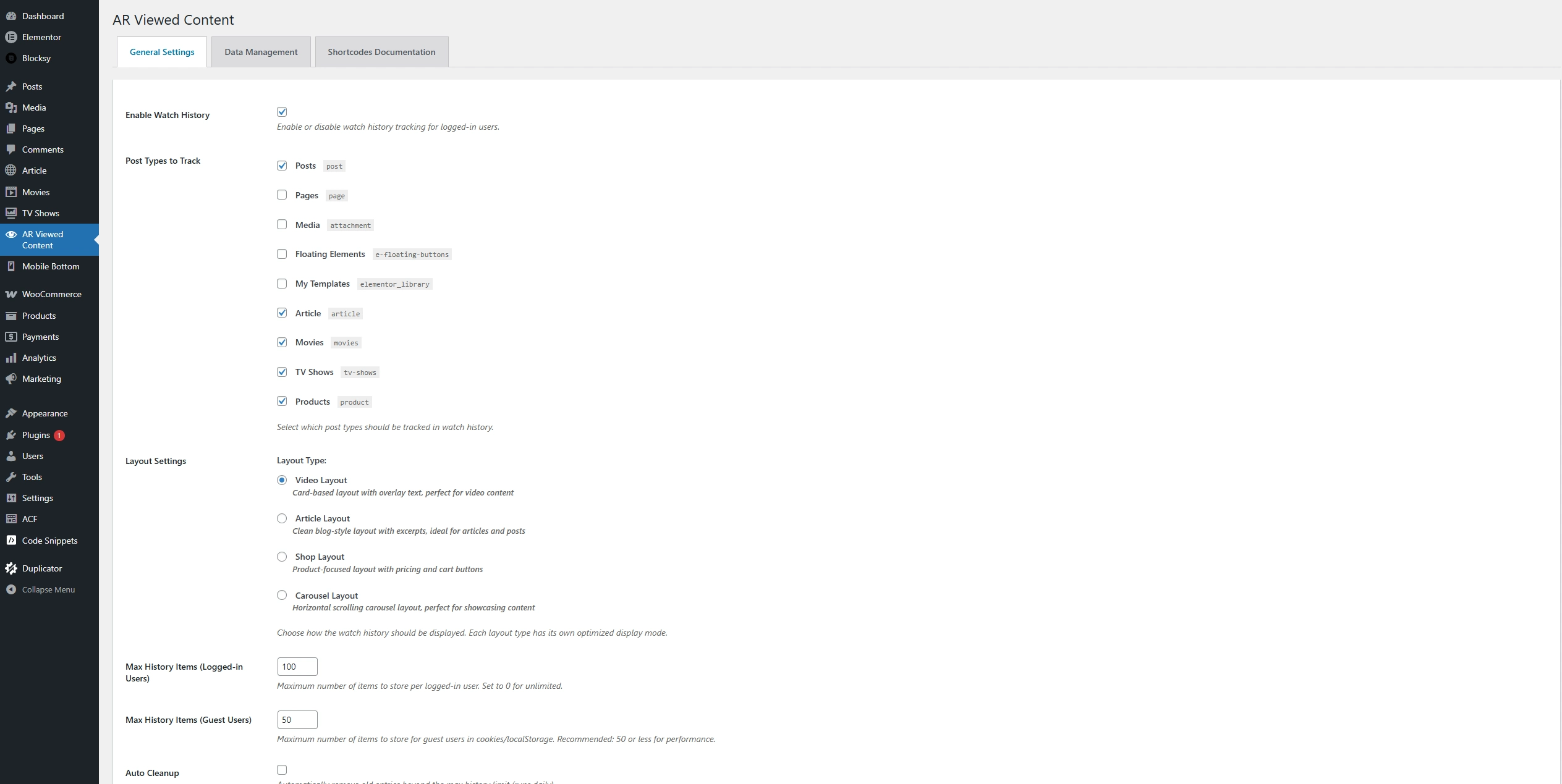
General Settings
# Enable/Disable Tracking
– **Option**: Enable Recently Viewed Tracking
– **Default**: Enabled
– **Description**: Master switch to enable or disable all tracking
# Maximum Items
**Logged-In Users**
– **Setting**: Maximum items for logged-in users
– **Default**: 100 items
– **Range**: 1-500 items
– **Description**: Maximum number of items stored per user
**Guest Users**
– **Setting**: Maximum items for guest users
– **Default**: 50 items
– **Range**: 1-200 items
– **Description**: Maximum items stored in cookies
#Cookie Settings
**Cookie Expiration**
– **Default**: 30 days
– **Description**: How long guest history is stored
**Cookie Name**
– **Default**: `arewa_recently_viewed`
– **Description**: Cookie identifier (advanced users only)
### Display Settings
# Default Layout Type
– **Options**: Video, Article, Shop, Carousel
– **Default**: Video
– **Description**: Default layout when no layout specified in shortcode
#### Items Per Page
– **Default**: 12 items
– **Range**: 1-100 items
– **Description**: Number of items displayed per page
#### Show Images
– **Default**: Yes
– **Description**: Display featured images in layouts
#### Show Dates
– **Default**: Yes
– **Description**: Display view dates/timestamps
#### Enable Pagination
– **Default**: Yes
– **Description**: Enable pagination for large histories
### Post Type Settings
#### Tracked Post Types
Select which content types to track:
– ☑ Posts
– ☑ Pages (Not Recommended)
– ☑ Products (WooCommerce)
– ☑ Custom Post Types
### Advanced Settings
#### Auto Cleanup
– **Option**: Enable automatic cleanup
– **Description**: Automatically remove old entries beyond maximum limit
#### Remove Data on Uninstall
– **Option**: Delete all data when plugin is uninstalled
– **Default**: Disabled
– **Warning**: This permanently deletes all user history
Shortcode Usage
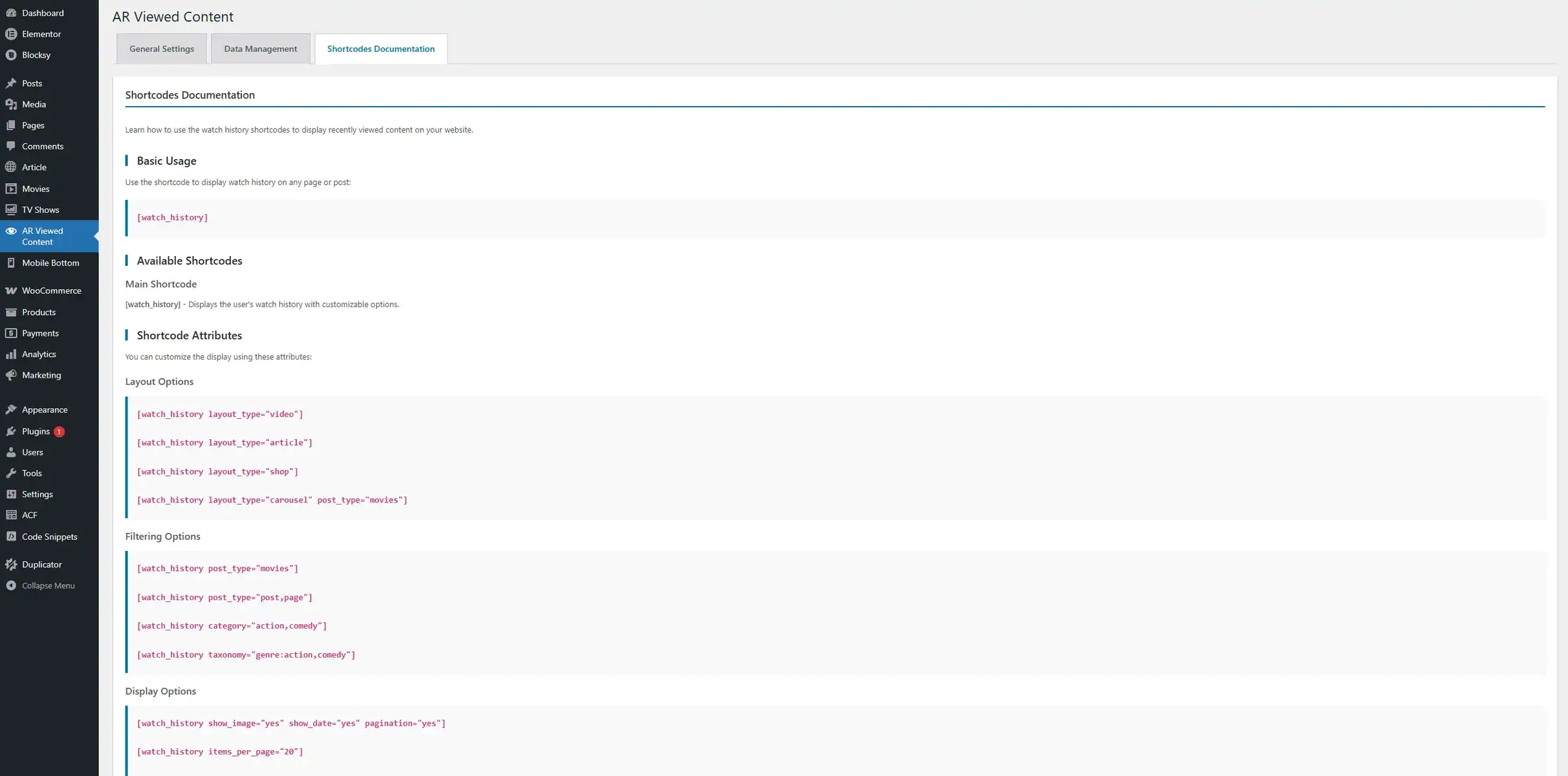
Basic Shortcode
[watch_history]
Displays recently viewed content with default settings.
Hides the “Clear All History” button. Default is “yes” (button visible).
[watch_history show_clear_all_history=”no”]`
[watch_history layout_type=”video” post_type=”movies” limit=”15″ show_date=”yes” show_clear_all_history=”no”]
### Shortcode Parameters
#### layout_type
Specifies the layout style.
**Values**: `video`, `article`, `shop`, `carousel`
**Examples**:
[watch_history layout_type=”video”]
[watch_history layout_type=”article”]
[watch_history layout_type=”shop”]
[watch_history layout_type=”carousel”]
#### post_type
Filters by post type.
**Values**: Any registered post type
**Examples**:
[watch_history layout_type=”article” post_type=”post”]
[watch_history layout_type=”carousel” post_type=”product”]
[watch_history layout_type=”video” post_type=”movies”]
[watch_history layout_type=”shop” post_type=”product,post”]
#### limit
Controls number of items displayed.
**Values**: Any positive integer
**Examples**:
[watch_history layout=”video” post_type=”movies” limit=”24″ pagination=”yes”]
[watch_history limit=”5″]
[watch_history limit=”10″]
[watch_history limit=”20″]
#### show_image
Controls image visibility.
**Values**: `yes`, `no`
**Examples**:
[watch_history show_image=”yes”]
[watch_history show_image=”no”]
#### show_date
Controls date visibility.
**Values**: `yes`, `no`
**Examples**:
[watch_history show_date=”yes”]
[watch_history show_date=”no”]
#### pagination
Enables or disables pagination.
**Values**: `yes`, `no`
**Examples**:
[watch_history pagination=”yes”]
[watch_history pagination=”no”]
#### category
Filters by category.
**Values**: Category names or slugs (comma-separated)
**Examples**:
[watch_history category=”news”]
[watch_history category=”news,sports”]
[watch_history category=”technology,science”]
#### taxonomy
Filters by custom taxonomy.
**Format**: `taxonomy:term1,term2`
**Examples**:
[watch_history taxonomy=”genre:action,comedy”]
[watch_history taxonomy=”location:new-york”]
[watch_history taxonomy=”genre:drama;location:usa”]
### Combined Examples
#### Example 1: Blog Articles
[watch_history layout_type=”article” post_type=”post” limit=”6″ show_date=”yes”]
#### Example 2: WooCommerce Products
[watch_history layout_type=”shop” post_type=”product” limit=”8″ pagination=”yes”]
#### Example 3: Video Content
[watch_history layout_type=”video” post_type=”movies” limit=”12″ show_image=”yes”]
#### Example 4: Carousel Widget
[watch_history layout_type=”carousel” limit=”10″ pagination=”no” show_date=”no”]
#### Example 5: Filtered by Category
[watch_history layout_type=”article” category=”technology,science” limit=”8″]
Layout Types
### Video Layout
**Best For**: Video platforms, media libraries, movie databases
**Features**:
– Responsive grid system
– Configurable columns (6 desktop, 4 tablet, 2 mobile)
– Large thumbnail images
– Overlay text with title and metadata
– Play button icon overlay
– Hover effects and transitions
– Post type labels
– View date display
**Customization Options**:
– Column count per device
– Image dimensions
– Title character limit
– Show/hide dates
– Show/hide images
**CSS Classes**:
– `.arwrev-container`
– `.arwrev-layout-video`
– `.arwrev-grid`
– `.arwrev-item`
– `.arwrev-item-image`
– `.arwrev-overlay`
### Article Layout
**Best For**: Blogs, news sites, magazine-style websites
**Features**:
– Magazine-style responsive grid
– 2 columns on desktop and tablet
– 1 column on mobile devices
– Featured images with gradient overlay
– Excerpt display (configurable length)
– Category badges
– “Continue Reading” button
– Smooth hover effects
– Remove button per item
**Customization Options**:
– Excerpt length
– Show/hide images
– Show/hide dates
– Category display
**CSS Classes**:
– `.arwrev-magazine-grid`
– `.arwrev-magazine-card`
– `.arwrev-magazine-image`
– `.arwrev-magazine-content`
– `.arwrev-magazine-title`
### Shop Layout
**Best For**: WooCommerce stores, online shops, e-commerce sites
**Features**:
– Product grid layout
– Product images with sale badges
– Price display (regular and sale prices)
– “Add to Cart” button
– “View Product” link
– Stock status indicators
– Recently viewed badge
– Remove from history button
– WooCommerce integration
**Requirements**:
– WooCommerce plugin must be active
**Customization Options**:
– Show/hide prices
– Show/hide add-to-cart button
– Grid or carousel mode
– Items per row
**CSS Classes**:
– `.arwrev-shop-container`
– `.arwrev-shop-grid`
– `.arwrev-shop-card`
– `.arwrev-shop-image`
– `.arwrev-shop-price`
### Carousel Layout
**Best For**: Homepage widgets, sidebar displays, featured content
**Features**:
– Horizontal scrolling layout
– Previous/Next navigation buttons
– Dot indicators
– Touch/swipe support
– Auto-height adjustment
– Responsive breakpoints
– Smooth transitions
– Category badges
– Price display (for products)
– “Add to Cart” button (for products)
**Customization Options**:
– Items visible per slide
– Auto-play settings
– Navigation style
– Transition speed
**CSS Classes**:
– `.arwrev-carousel-container`
– `.arwrev-carousel-wrapper`
– `.arwrev-carousel-track`
– `.arwrev-carousel-card`
– `.arwrev-carousel-nav`
Advanced Features
### 1. History Management
Automatic Revisit Handling
When a user revisits previously viewed content:
– Timestamp updates to current time
– Item moves to first position
– Maintains most-recent-first ordering
– No duplicate entries
#### Manual History Clearing
Users can clear their history:
– “Clear All History” button (logged-in users)
– Individual item removal
– Instant update without page reload
### 2. AJAX Functionality
#### Remove Individual Items
“`javascript
// Triggered by remove button click
// Updates history without page reload
// Smooth fade-out animation
#### Clear All History
“`javascript
// Clears entire user history
// Confirmation dialog
// Instant UI update
### 3. Mobile & WebView Support
#Cookie Handling
– Works in mobile app WebView
– Proper cookie domain settings
– Secure cookie flags
– HttpOnly for security
#### Responsive Design
– Touch-friendly buttons
– Swipe gestures (carousel)
– Optimized for small screens
– Fast loading on mobile networks
### 4. Performance Optimization
– Database Queries
– Efficient WP_Query usage
– `no_found_rows` for speed
– Proper indexing
– Minimal database calls
#### Caching
– User meta caching
– Post data caching
– Transient API usage
– Object cache support
#### Asset Loading
– Conditional script loading
– Minified CSS/JS
– Deferred loading
– No external dependencies
Use Cases
### 1. E-Commerce Websites
**Scenario**: Online store selling electronics
**Implementation**:
[watch_history layout_type=”shop” post_type=”product” limit=”8″]
**Benefits**:
– Reminds customers of products they viewed
– Increases conversion rates
– Reduces cart abandonment
– Improves user experience
### 2. News & Magazine Sites
**Scenario**: News website with multiple categories
**Implementation**:
[watch_history layout_type=”article” post_type=”post” limit=”6″ show_date=”yes”]
**Benefits**:
– Helps readers find articles they were reading
– Increases page views per session
– Improves content discovery
– Enhances user engagement
### 3. Video Streaming Platforms
**Scenario**: Video platform with movies and TV shows
**Implementation**:
[watch_history layout_type=”video” post_type=”movies” limit=”12″]
**Benefits**:
– “Continue Watching” functionality
– Personalized user experience
– Increased watch time
– Better content recommendations
### 4. Educational or E-Commerce Websites
**Scenario**: Online learning platform with courses
**Implementation**:
[watch_history layout_type=”carousel” post_type=”courses” limit=”10″]
**Benefits**:
– Students can resume courses easily
– Tracks learning progress
– Improves course completion rates
– Enhances learning experience
### 5. Real Estate Websites
**Scenario**: Property listing website
**Implementation**:
[watch_history layout_type=”article” post_type=”property” limit=”8″ taxonomy=”location:new-york”]
**Benefits**:
– Buyers can revisit properties
– Saves favorite listings
– Improves lead generation
– Better user engagement
Performance & Optimization
### Database Optimization
#### Efficient Queries
“`php
// Uses WP_Query with optimized parameters
‘no_found_rows’ => true,
‘posts_per_page’ => $limit,
‘post__in’ => $post_ids,
‘orderby’ => ‘post__in’
#### User Meta Storage
– Single meta key per user
– Serialized array storage
– Automatic cleanup of old entries
– Indexed for fast retrieval
### Caching Strategy
#### User Meta Caching
– WordPress object cache integration
– Persistent cache support
– Automatic cache invalidation
#### Post Data Caching
– Transient API usage
– Configurable cache duration
– Smart cache warming
### Asset Optimization
#### CSS
– Minified production files
– Critical CSS inline
– Non-blocking loading
– Mobile-first approach
#### JavaScript
– Minified and compressed
– Deferred loading
– No jQuery dependency
– Vanilla JavaScript for speed
### Performance Benchmarks
**Average Load Time Impact**: < 50ms
**Database Queries Added**: 1-2 per page
**Memory Usage**: < 1MB
**Asset Size**: CSS (15KB) + JS (20KB)
Privacy & GDPR Compliance
### Data Collection
## What Data is Collected?
– Post ID (which content was viewed)
– Post Type (type of content)
– Timestamp (when it was viewed)
– User ID (for logged-in users only)
#### What Data is NOT Collected?
– Personal information
– IP addresses
– Browser fingerprints
– Location data
– Third-party tracking
### Cookie Usage
## Cookie Details
– **Name**: `arewa_recently_viewed`
– **Purpose**: Store guest viewing history
– **Duration**: 30 days
– **Type**: Functional (necessary for feature)
– **Third-party**: No
#### GDPR Compliance
– Cookies are functional, not tracking
– No personal data in cookies
– User can clear history anytime
– No data shared with third parties
– Complies with ePrivacy Directive
### Privacy Policy Recommendations
Add this to your privacy policy:
Recently Viewed Content
Our website uses the “Arewa Recently Viewed Content” plugin to enhance your browsing experience by showing you content you recently viewed.
What data we collect:
– List of pages/posts you viewed
– Timestamps of when you viewed them
How we store this data:
– Logged-in users: Stored in your user account
– Guest users: Stored in a browser cookie for 30 days
You can clear your viewing history at any time using the “Clear All History” button.
This data is not shared with third parties and is used solely to improve your experience on our website.
### User Rights
#### Right to Access
Users can view their history on any page with the shortcode
#### Right to Deletion
– “Clear All History” button
– Individual item removal
– Complete data removal on account deletion
#### Right to Opt-Out
Users can:
– Disable cookies in browser
– Clear history manually
– Request account data deletion
Troubleshooting
Common Issues
#### Issue 1: History Not Tracking
**Symptoms**: Content views not being recorded
**Solutions**:
1. Check if tracking is enabled in settings
2. Verify post type is selected for tracking
3. Clear browser cache and cookies
4. Check for JavaScript errors in console
5. Ensure you’re viewing singular posts/pages
#### Issue 2: Guest History Not Syncing
**Symptoms**: Guest history not merging on login
**Solutions**:
1. Check cookie settings in browser
2. Verify cookie domain is correct
3. Clear browser cache
4. Check for cookie blocking extensions
5. Test in incognito/private mode
#### Issue 3: Shortcode Not Displaying
**Symptoms**: Shortcode shows as text or nothing appears
**Solutions**:
1. Verify shortcode syntax is correct
2. Check if plugin is activated
3. Clear page cache (if using caching plugin)
4. Check for theme conflicts
5. Test with default WordPress theme
#### Issue 4: Layout Not Responsive
**Symptoms**: Layout breaks on mobile devices
**Solutions**:
1. Clear browser cache
2. Check for CSS conflicts
3. Verify theme is responsive
4. Test with default layout
5. Check browser console for errors
#### Issue 5: WooCommerce Products Not Showing
**Symptoms**: Shop layout shows no products
**Solutions**:
1. Verify WooCommerce is active
2. Check if products are published
3. Ensure product post type is tracked
4. Clear WooCommerce cache
5. Check product visibility settings
### Debug Mode
Enable WordPress debug mode to troubleshoot:
“`php
// Add to wp-config.php
define(‘WP_DEBUG’, true);
define(‘WP_DEBUG_LOG’, true);
define(‘WP_DEBUG_DISPLAY’, false);
“`
Check debug log at: `/wp-content/debug.log`
### Browser Console
Check for JavaScript errors:
1. Open browser developer tools (F12)
2. Go to Console tab
3. Look for errors related to “wpvw” or “arewa”
4. Report errors with full stack trace
### Conflict Testing
Test for plugin/theme conflicts:
1. **Disable Other Plugins**
– Deactivate all plugins except Arewa Recently Viewed Content
– Test if issue persists
– Reactivate plugins one by one
2. **Switch Theme**
– Temporarily switch to default WordPress theme
– Test if issue persists
– If resolved, contact theme developer
General Questions
Frequently Asked Questions
General Questions
Technical Questions
Privacy Questions
WooCommerce Questions
Conclusion
Arewa Recently Viewed Content is a powerful, privacy-friendly solution for tracking and displaying recently viewed content on your WordPress website. With its dual tracking system, multiple layout options, and extensive customization capabilities, it’s the perfect choice for any website looking to improve user engagement and experience.
### Key Takeaways
✅ **Easy to Install**: Simple installation and configuration
✅ **User-Friendly**: Works seamlessly for all users
✅ **Privacy-Focused**: GDPR compliant and secure
✅ **Performance Optimized**: Minimal impact on site speed
✅ **Highly Customizable**: Multiple layouts and options
✅ **Well Supported**: Comprehensive documentation and support
### Next Steps
1. Install the plugin
2. Configure your settings
3. Add shortcode to your pages
4. Customize the appearance
5. Monitor user engagement
Thank you for choosing Arewa Recently Viewed Content!
—
**Version**: 2.0.5
**Last Updated**: 10-02-2026
**Author**: A-SAID
**License**: GPL v2 or later